Movavi - Video Editor
- 4.3
- Rating
- 10.00M
- Installs
- Free
- Price

 Analysis by App-foxy
I spent time with Movavi - Video Editor as a practical mobile editing tool rather than treating it like a miniature desktop studio. It is an app from Movavi in the Video Players & Editors category, aimed at people who want to turn phone clips into something presentable without learning a complicated timeline first. My overall impression is that it works best as a quick, approachable editor for everyday videos, social posts, family moments, and short music-backed montages.
The app is free to install and suitable for Everyone, which makes it easy to recommend as a first experiment. It has also built a sizeable audience, with more than ten million installs and an average rating of 4.3 from roughly 276 thousand ratings. Those figures do not make it automatically right for everyone, but they do suggest that its basic editing approach is accessible to a broad range of phone users.
How Movavi feels during ordinary editing
The first thing I noticed is that the app is designed around momentum. You choose material, make visible changes, and move toward a finished clip instead of spending a long time setting up a professional project. That matters when the goal is to share a birthday video, trim a holiday clip, or combine a few phone recordings with music before the moment passes.
You May Also Like

 Blood Strike: 2.5 Anniversary
Blood Strike’s Loadouts Turn Every Drop Into a Tactical Gamble
A close look at Blood Strike’s custom loadouts: how fast access to signature weapons reshapes its battle royale rhythm, rewards preparation, and narrows the gap between fights.

 Pandora - Music & Podcasts
Pandora’s Music Is Easy to Start, but Harder to Recover
Pandora’s strength is its low-effort path from a seed to a station. Its weak spot is how much confidence it asks you to place in connection, setup, and quiet recovery.

 8 Ball Pool
 Is Built on Rivalries, Rematches, and Routine
A close look at the rivalries, rematches, shared routines, and unanswered safety questions that turn a quick pool match into a persistent mobile community.

 Samsung Music
’s Quiet Strength Is Playing What You Already Own
Its reach comes less from spectacle than from dependable access to a personal library. That simplicity is both the app’s strongest retention engine and its ceiling.

 AccuWeather: Weather Radar
AccuWeather Review: A Quick, Clear Forecast for Everyday Decisions
For everyday plans, the best forecast is the one you can understand quickly. AccuWeather makes rain timing, radar, and local conditions easy to act on, with a few trade-offs.

 Hill Climb Racing
Why Hill Climb Racing Still Turns Crashes Into One More Run
A tiny car, a bumpy hill and one more upgrade: Hill Climb Racing keeps resurfacing because its simple chaos makes every near-miss feel personal.
More From Our News Desk



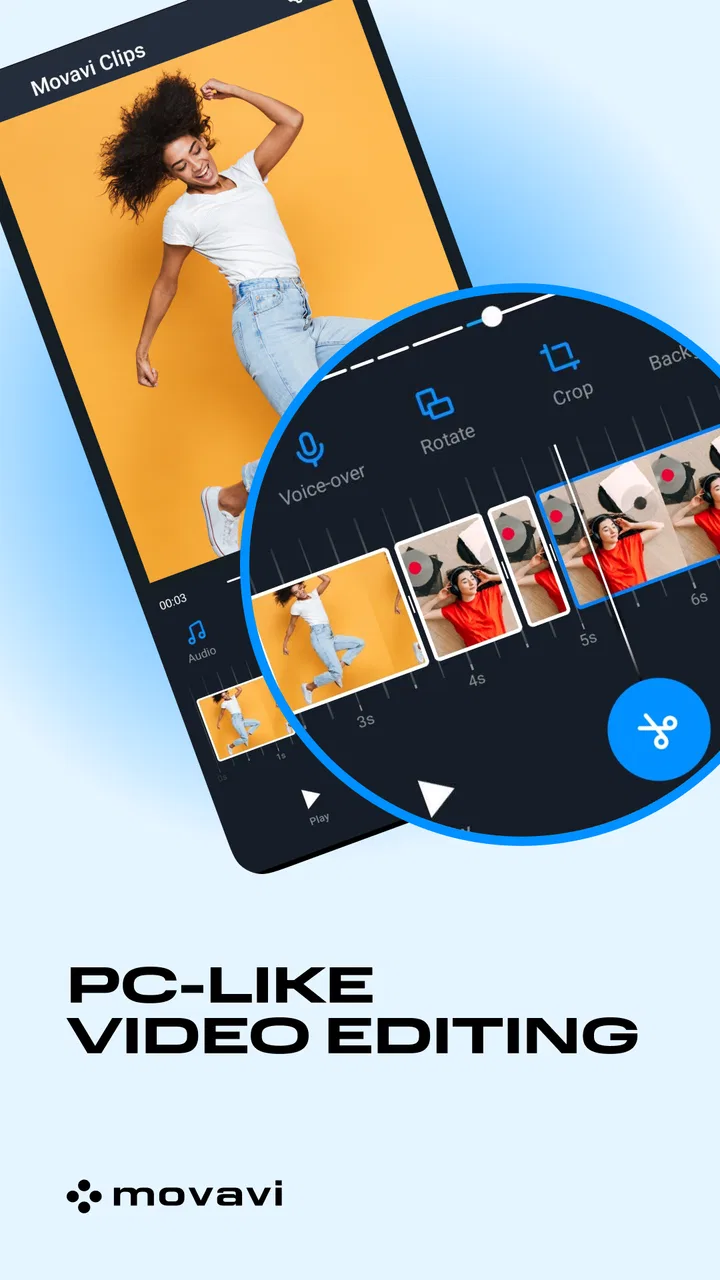
In my experience, the perceived speed comes less from doing complex work instantly and more from reducing the number of decisions placed in front of you. A beginner can understand the basic path quickly: bring in video, arrange or adjust it, add a soundtrack or visual treatment, preview the result, and export. That straightforward flow is one of the app's strongest qualities.
It is worth separating editing speed from export speed. The editing interface can feel responsive when you are making small changes, but final rendering is naturally more demanding than cutting a clip or changing its order. The exact experience depends on the phone, the length of the project, the number of source clips, and how ambitious the final video is. I would not choose this app expecting every large project to finish immediately.
A useful habit is to begin with a small selection of clips rather than importing an entire camera roll. This keeps the project easier to understand and reduces the chance of spending time searching through unrelated footage. It also gives the preview less material to manage while you decide what belongs in the final sequence.
Where the quick workflow helps most
Movavi is particularly comfortable for short, purpose-driven jobs. Imagine recording a child's school performance, taking several brief clips, and wanting to send relatives a cleaner version that avoids long pauses. I would use the editor to remove the waiting sections, put the strongest moments first, add suitable music if the original sound is not enough, and watch the complete sequence before saving it.
Another realistic use is a small travel recap. Instead of trying to document every minute, I would select a handful of clips with different viewpoints, keep the transitions restrained, and use music to give the sequence a consistent rhythm. The app's value here is not that it replaces a full production suite; it helps me reach a shareable result before the trip becomes old news.
For social content, the same approach works when the video needs basic polish rather than elaborate visual effects. Short clips benefit from removing dead time, keeping the opening clear, and avoiding too many decorative additions. Movavi encourages that kind of quick assembly, although users who want exact control over every frame may soon find its simplified approach limiting.
The best performance tip is to edit for the finished purpose, not for every possibility. A short clip made for messaging does not need the same preparation as a carefully archived family film. Keeping the project focused makes the work feel faster and makes mistakes easier to spot.
What happens when a project becomes busy
The experience changes when a simple montage turns into a heavier edit. More source material means more time spent organizing, and repeated previews can become less convenient as the project grows. Large clips, several adjustments, and a longer soundtrack all create more work for the phone, even if the interface itself remains familiar.
This is where I would avoid judging the app only by its opening moments. A quick edit with a few short recordings is a different task from combining a long collection of high-quality clips. If you are planning a substantial project, I would first make a short test edit using the same kind of footage. That gives you a practical sense of whether your device feels comfortable before you commit to a larger timeline.
Heavy use also exposes the difference between a mobile editor and desktop software. On a computer, a large screen makes it easier to compare clips, manage layers, and review a longer sequence. On a phone, the same work can feel cramped simply because your fingers and the display compete for space. Movavi is not unusual in that respect, but its quick-edit identity means it is better suited to staying light than to encouraging elaborate productions.
I also recommend saving an intermediate version of an important project when your workflow allows it. If you are preparing a once-only event video, do not wait until the final minute to discover that a clip needs replacing or that the sequence does not feel right. Short preview exports or staged edits can reduce the frustration of rebuilding a long project.
Stability and recovering from mistakes
Reliability in a video editor is more than whether it opens. I look at how easy it is to correct an accidental change, revisit an earlier decision, and continue after an interrupted session. Movavi feels most dependable when I treat it as a focused editing workspace: select the material first, make changes in a sensible order, and review before moving on.
That method also makes recovery easier. If the result feels wrong, I can identify whether the problem is the clip order, the pacing, the music, or an unnecessary visual treatment. Working in small stages is less dramatic than making dozens of changes at once, because I always have a clearer idea of what caused the unwanted result.
Phone editing can be vulnerable to ordinary interruptions: a low battery, limited free storage, another demanding app running in the background, or a project that is simply too ambitious for the device. These are not unique flaws in Movavi, but they are practical reasons to avoid editing an important video under rushed conditions. I would close unrelated apps, keep enough storage available for source and output files, and avoid starting a major export when the phone is already struggling.
The app's free entry point is helpful for testing that routine. You can find out whether its controls suit your hands and whether your phone handles the kind of footage you normally record before deciding whether to spend money. In-app purchases range from $0.99 to $21.99 per item, so I would inspect what is included in the version you intend to use before building a workflow around a particular paid element.
Device limits matter more than the app description suggests
The minimum operating-system requirement is Android 8.0 or later. That makes the compatibility boundary reasonably clear, but operating-system support alone does not tell me how comfortable editing will feel on every compatible phone. A newer device with more breathing room is likely to feel better during longer projects than an older phone that technically meets the requirement.
Screen size is another overlooked constraint. On a compact phone, selecting a precise point in a clip can feel fiddly, especially when you are trying to make a cut that depends on a person's expression or a beat in the music. A larger display does not change the app's tools, but it can make the timeline easier to inspect and reduce accidental taps.
Storage planning is equally important. Video files are large, and an edited result needs somewhere to be created in addition to the original recordings. I would avoid filling the phone with duplicate exports. Keep the original clips in a clearly named folder, create one review copy when necessary, and remove failed versions after deciding which result is worth keeping.
There is also a difference between a phone being able to open the editor and being pleasant for repeated editing. If your device becomes hot, slows down in other apps, or frequently runs low on space, I would keep projects short and export one finished video at a time. For regular, demanding work, a desktop editor or a more powerful tablet may be a better investment than trying to push a mobile app beyond its comfortable range.
Music, pacing, and the trade-off between simplicity and control
The music-focused side of Movavi is useful because sound can make a collection of ordinary clips feel intentional. A sequence with uneven original audio often becomes easier to watch when the clips share a consistent musical bed. I would still keep the music subordinate to important speech: if someone is talking, lowering or removing the soundtrack is more valuable than choosing a more exciting song.
That leads to one of the app's practical trade-offs. A simplified editor helps me finish quickly, but it may not offer the same depth as a dedicated professional tool when I need detailed audio mixing, precise color work, complex compositing, or a carefully managed multi-track production. Movavi makes sense when the important question is “Can I make this look and sound better today?” It is less convincing when the question is “Can I control every technical part of a serious production?”
I would also resist adding effects simply because they are available. In a family montage, too many transitions can distract from the people and events that matter. A clean cut, a sensible order, and music that matches the mood often produce a more polished result than a crowded sequence. The app is easiest to use well when I treat its creative options as tools, not decorations.
For users who already understand professional timelines, this may feel restrictive. They may prefer an editor built around finer control, especially if they routinely work with layered audio, detailed adjustments, or long-form footage. For beginners and casual creators, however, the same restraint can prevent them from getting lost in settings they do not yet need.
Who should use it, and who should choose something else
I would recommend Movavi to someone who records on a phone and wants a friendlier route from raw clips to a finished video. It is a good match for parents making short family recaps, travelers assembling highlights, students preparing simple visual projects, and casual creators who value a quick learning curve over exhaustive control.
It is also a sensible choice for people who do not want to pay before testing the workflow. Because the app is free to start, I can judge the editing experience on my own device and decide whether the available purchase options are worthwhile for my needs. That is more useful than choosing based only on a feature list.
I would skip it, or at least compare it carefully with a more advanced alternative, if your work depends on exact frame-level decisions across a long project. The same applies if you need a desktop-style production environment, extensive sound control, or a workflow built around many visual layers. A mobile editor can be convenient without being the best tool for every production standard.
There is a middle group too: users who want fast edits but are sensitive to storage, device heat, or long export sessions. For them, the right decision depends on project size. Movavi can still be useful for short videos, while another option may be preferable for repeated heavy editing. I would not make that choice from the app's category alone; I would test it with the footage I actually use.
Version, support expectations, and everyday value
The current version is 4.22.9, and the app has been available since July 26, 2017. That history gives it the feel of an established mobile product rather than a brand-new experiment. Movavi is the developer, and the app's continued presence alongside its large install base makes it easy to understand why people keep it in consideration when looking for a phone editor.
Still, a long-running app can evolve, and the exact feel of an editor may change between versions or devices. I would keep the app updated through the normal platform process, especially if I rely on it for regular projects. At the same time, I would avoid assuming that an update turns a phone into a professional workstation; the device remains a major part of the experience.
The age rating of Everyone also fits the app's broad, practical purpose. That does not mean every editing decision is automatically simple, but it does make the tool approachable for households where different people may want to create short videos. The most important learning step is not mastering every option. It is understanding how to select useful footage, keep the pacing clear, and review the complete result before sharing it.
My final performance judgment is positive with a clear boundary. Movavi feels fast enough for focused, short-form editing, and its uncomplicated workflow reduces the time between opening the app and seeing a coherent result. It is less suited to long, resource-heavy projects where a larger screen, deeper controls, and a more powerful editing environment would matter more.
I would recommend it as a practical first editor, not as a replacement for a full production suite. If your goal is to turn phone footage into a clean clip with music and basic polish, it gives you a comfortable place to start. If your goal is maximum precision, complex layering, or dependable handling of demanding projects, I would look beyond this app. For everyone in between, the free installation makes the decision easy: try it with a real short project, watch how your own device handles the process, and judge the result by whether it helps you finish rather than merely offering more buttons.
FAQs for Movavi - Video Editor
01What is Movavi Video Editor, and who is it designed for?
Movavi Video Editor is a beginner-friendly video editing application for creating and polishing videos on supported Android, iOS, and desktop platforms, depending on the version available in your region. It is aimed at casual creators, students, families, vloggers, and social media users who want to trim clips, combine footage, add music, apply transitions, and export attractive videos without learning a complicated professional editing workflow.
02Does Movavi Video Editor offer enough tools for serious video editing?
Movavi includes many useful tools for everyday editing, such as cutting and splitting clips, cropping, filters, transitions, text overlays, stickers, music, speed adjustments, and basic color or audio improvements. However, advanced editors may find it less comprehensive than professional software with deeper audio mixing, multicamera editing, extensive keyframing, and highly customizable effects. It is best suited to personal projects and online content.
03Is Movavi Video Editor free to use, or does it require a subscription?
Movavi Video Editor may be available as a free download, but some features, effects, export options, or premium content can be restricted behind in-app purchases, a subscription, or a paid license. The exact pricing and limitations depend on the platform and current store offer. Before editing a major project, check the purchase terms, trial conditions, renewal details, and whether the free version adds any watermark.
04Can Movavi Video Editor export videos for YouTube, TikTok, Instagram, or other platforms?
Yes, Movavi Video Editor is designed to prepare videos for common online destinations and personal sharing. You can generally choose a suitable resolution and format, then save the finished project to your device or share it through supported services. Export speed depends on video length, resolution, effects, and device performance. For social media, check the platform’s current aspect-ratio and file-size requirements before exporting.
05Will Movavi Video Editor work smoothly on my phone or computer?
Performance depends on your device’s operating system, processor, available memory, storage space, and the resolution of your source footage. Basic projects should run comfortably on many modern devices, while 4K clips, numerous effects, and long timelines require more resources and may take longer to preview or export. Keep the application updated, close unnecessary apps, and maintain free storage to reduce crashes and processing delays.
Pros
- Simple timeline makes trimming
- splitting
- and arranging clips easy.
- Includes transitions
- filters
- stickers
- titles
- and music for quick edits.
- Supports common video formats and resolutions for flexible exporting.
- Useful templates help create polished social media videos faster.
- Clean interface is approachable for beginners with little editing experience.
Cons
- Many premium effects and tools require a subscription or separate purchase.
- Exported videos may include a watermark when using the free version.
- Advanced audio mixing and color-grading controls are relatively limited.
- Long projects can feel demanding on storage and device performance.
- Some features may require an internet connection or account sign-in.

Movavi - Video Editor
Gallery